← All solutions
For mechanical & MEP subcontractors

From the bid to the last pay application

For mechanical, HVAC and MEP subcontractors on GC projects: take off and price the job, buy out each scope, run submittals and RFIs, and bill the GC — with the numbers agreeing all the way through.

Sound familiar?

What it costs to run on five different tools

Spreadsheets for every scopeThe estimate, the buyout and the pay application live in three files that never agree.
Submittals by handCut sheets copied page by page into a package the night before it’s due.
The GC’s system, not yoursRFIs and submittals live in the GC’s Procore while your own job records live somewhere else.
In MEPSub

The project, the way the GC sees it — and the way you get paid

Takeoff to estimate

AI Takeoff reads PDF, DXF and DWG drawings, counts equipment and measures duct and pipe; the estimate is priced from your Price Book.

Scope buyout

Each scope in-house or by a sub, from the bid to the last payment — with bid leveling and the AIA to the GC by scope.

Submittals from the spec

Build the register from the specs; AI copies tags and models from the schedules and picks the cut sheet pages.

RFIs with ball in court

Questions written with AI help, addressed from the project directory and tracked to the answer.

Schedule and look-aheads

CPM with baselines, and each sub’s look-ahead with crew needed vs promised vs on site.

Change orders and AIA

Changes line by line flow into the G702/G703 schedule of values; field progress suggests each line’s percentage.

The job, scope by scope

See every scope carried in the bid: in-house or by a sub, what it costs, what it carries and what is still a plug — and buy it out against those numbers once you win.

  • In-house or sub, per scope
  • Sub numbers carried with your markup
  • Buyout against the estimate once the job is won
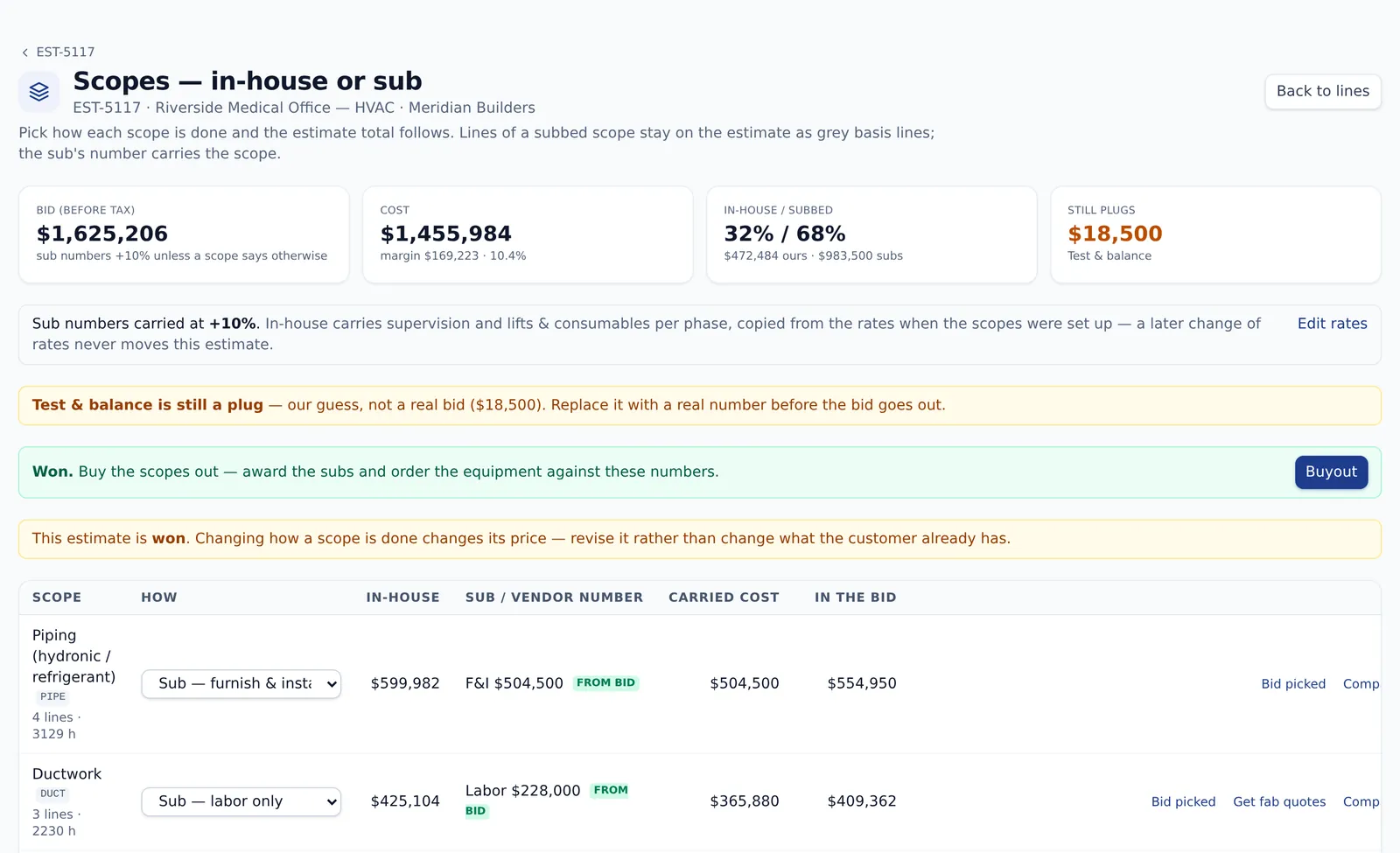
app.mepsub.org/app/estimates · Scopes
MEPSub scopes: in-house or sub, per scope, with the carried cost
And the rest of the business

Procore, the field and the money

Procore connected

Connect your own Procore login, link the project, answer RFIs and change submittal status from MEPSub.

Daily logs and punch

Daily logs with a row per sub, punch lists, permits and inspections.

Cost to complete

Forecast per cost code, committed cost, backcharges both ways and the WIP report.

Lien waivers and retainage

AIA lien waivers, retainage held and released, sub pay applications.

What you’d use

Pay for the parts you run

Every plan starts with the Core — add the packs this kind of company uses. Priced per user, month to month.

Core$15/user

Customers, schedule, estimating, proposals, invoices and the Price Book — in every plan.

Projects & PM+$6/user

Projects, RFIs, submittals, change orders, punch lists, subcontracts and Scope buyout.

AI pack+$9/user

AI Takeoff, AI documents and the AI assistant, with AI credits every month.

Shop & Materials+$6/user

Purchase orders, RFQs, inventory and count sheets, material requests and the fab shop.

Build your plan →

Go deeper

The pages behind this one

Questions, answered

Does it replace Procore?

No — it works next to it. Your GC keeps Procore; you connect your own login, link the project and work its RFIs and submittals from MEPSub, next to your own estimate, buyout and billing.

Which drawings does AI Takeoff read?

PDF plan sets, DXF and DWG files, and phone photos. Counts are re-checked by a verifier, and anything it could not settle comes back as a question.

Can it bill the GC on AIA forms?

Yes. AIA G702/G703 with a schedule of values, approved change orders folded in, retainage and lien waivers.

Can I try it first?

Yes. Start free with up to 3 users and no credit card, or book a 30-minute demo on one of your own jobs.

Bid it, build it and bill it in one place

See it on your own work in a 30-minute demo — or start free with up to 3 users, no credit card.

MEPSub
Pricing → Book a demo →
Start free →Log in▶ Try the live demo